
Everyday Features:
There are several ways to animate objects within Opus Creator and Opus Pro including tween and path animation as well as animation scripts. You can have as much or as little control as you wish and QuickAnim preset animations mean special effects are easy to achieve without programming.
The Tween object allows sophisticated animations to be created very easily and even includes shape tween animation. Simply create the state of the object at the beginning and the end, and/or at key points along the way.
Opus then automatically creates all the frames in-between for a smooth transition without you having to do anything.
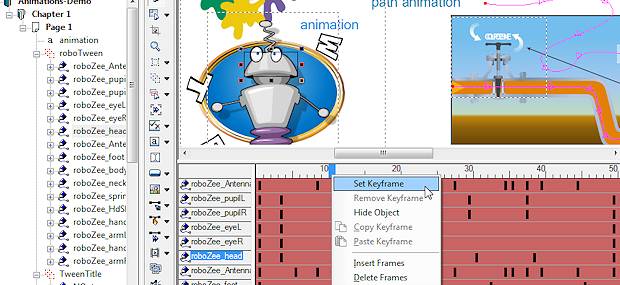
Tween animation is available in both Opus Creator and Opus Pro and is fully-supported in Flash and HTML5 export.
Thuis feature makes creating any animation easier and more intuitive than standard animation actions as you simply place the object where you want it on screen and let Opus do the rest. It also adds possibilities of its own as it includes the option to morph the shape of an object using shape tweening.
Further Details - Shape Tweening
Further Details - Colour Tweening
Any object can be animated along a custom path. Draw the path you want using the vector drawing tools and then use the Follow Path animation action to send your chosen object or objects along the path.
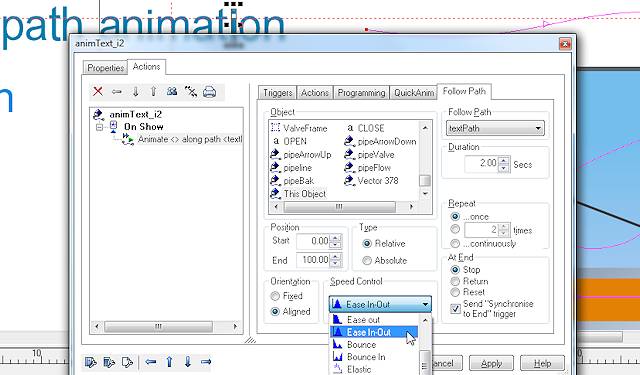
You can set the object to move over the actual path (irrespective of the object's original position) by using the "Absolute" option or it can follow the shape of the path but start from the current postion of the object itself by using the "Relative" option. The object can also follow the path but remain in it's original orientation or it can align to the path which will cause it to rotate to match the direction the path is going.
The same path can be used for multiple objects and the path itself can be animated or stretched to provide even greater flexibility.
Path animation is supported in Flash and HTML5.
You can also design animations to take place just like any other action. You can send an object in a particular direction, bounce it around the screen or fade it in and/or out. You can even draw a path for it to move along and then send it backwards and/or forwards along that path. Like any other action you choose the event which will trigger the animation and then select and apply the various settings speed/timing, direction and so on simply by selecting the options from a dialogue.
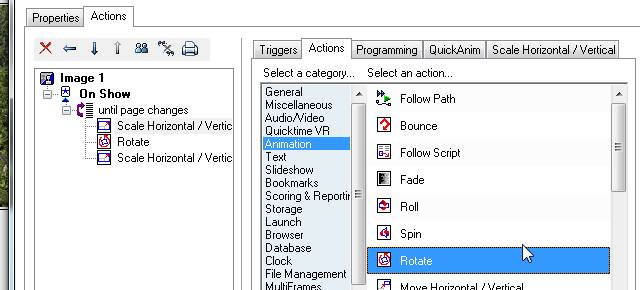
You can use Opus action structures such as "Loop until Page Changes" or "Simultaneous Actions" for even more flexible results and even combine these actions into a script to perform a series of movements with a single trigger.
All aspects of Animation Actions are supported in HTML5 and Flash without the need for programming.
Professional animators know that objects never travel at the same speed through the animation. Computer animation can often seem unrealistic because the animation starts and ends too quickly. In real life objects start slowly as they overcome inertia and then slow down to come to a stop - unless they run into a brick wall and then they usually bounce if only slightly. Opus provides a series of speed settings for any animation action to create these effects easily - it includes Ease In and Ease Out which create a more realistic-looking animation and Bounce and Elastic which are just plain fun!
And to get you started quickly we've even provided sets of preset animation actions which you can simply select from a list and apply to your object. Including Pulse, Acrobat, Spin Dry, Penguin Waddle, Kaboom and many more.
The simplest animations are transitions which occur when the object appears on screen or when it disappears or is hidden by a Hide action. There are a wide range from simple fades and scrolls to 3D flips, page curls and kaleidoscope effects. All you do is pick the category and choose a transition and then decide how long it should take.
Many transition effects are supported in Flash and HTML5 and others can be created by using the animation actions detailed above.
You can also include objects which are already animated such as Flash SWF files and videos and can even animate those again using the Opus animation facilities. So, for example, you could have a SWF of a flapping bird which you then animated along a path using Opus path animation tools.
SWF support is not currently available in HTML5.
create HTML5 and Flash animation easily with Opus Creator